
সংক্ষেপে: DDR4 and DDR5 are not interchangeable — your motherboard decides which one you can use. AM4 Ryzen and most budget Intel 12th–14th gen boards take DDR4; AM5 Ryzen 7000/8000 boards take DDR5 only. For most people 16GB in two sticks (dual-channel) is the right amount; 8GB is only for basic office work.
RAM price in Bangladesh has a wide spread: a single 8GB DDR4 desktop stick starts around Tk 8,250, while a 16GB DDR5 6000MHz stick costs Tk 34,560. Before you compare prices, though, you need to know one thing: DDR4 vs DDR5 is not a choice you make freely — it is decided by your motherboard and processor. This guide explains which boards and CPUs take which memory, how much RAM you need (8GB vs 16GB vs 32GB), why two sticks are better than one, what XMP and EXPO do, and how desktop RAM differs from laptop RAM. Our full desktop RAM price list and picks are below.
DDR4 vs DDR5: the key differences
- Not compatible with each other: DDR4 and DDR5 desktop sticks look similar, but the notch is in a different place. A DDR4 stick will not go into a DDR5 slot, and the reverse is also true. Never force a stick.
- Speed: DDR4 desktop RAM is most common at 3200MHz. DDR5 starts higher — our DDR5 sticks are 5600MHz and 6000MHz.
- Latency numbers: DDR5 has higher CL numbers (CL32, CL36) than DDR4 (CL16), but because it runs at a much higher speed, the real-world delay is similar. Do not compare CL across generations.
- Voltage: our DDR5 Kingston FURY Beast runs at 1.25V; DDR4 performance sticks are typically 1.35V.
- Cost: DDR5 costs noticeably more per GB. In our list, 8GB DDR5 costs more than 16GB DDR4.
Is DDR5 faster in practice? On a new AM5 or DDR5 Intel platform, yes, it gives more memory bandwidth, which helps integrated graphics and some heavy workloads. But a DDR4 build with a good CPU and graphics card is still a very capable PC, and the money saved on RAM and board can go to a better GPU or SSD.
Which boards and CPUs take DDR4 or DDR5?
The rule is simple: the motherboard's memory type decides. The CPU must also support that type.
- AMD AM4 (Ryzen 5000 and older, e.g. Ryzen 5 5600, 5600GT, Ryzen 7 5700X): DDR4 only, officially up to 3200MHz.
- AMD AM5 (Ryzen 7000 / 8000 / 9000, e.g. Ryzen 5 7600, 8600G): DDR5 only. Our Ryzen 5 7600 and 8600G list DDR5 support up to 5200.
- Intel LGA1700 (12th, 13th, 14th gen, e.g. i3-12100, i5-12400F, i5-14400F, i7-14700): the CPU supports both DDR4 and DDR5, but each board supports only one. Boards marked "D4" or "DDR4" take DDR4.
- Intel LGA1851 (Core Ultra 200, e.g. Core Ultra 5 225): DDR5 only, and it needs an 800-series board — call us for a matching board.
| Our motherboard | Socket | RAM type | RAM slots |
|---|---|---|---|
| BIOSTAR A520MH / ASRock A520M-HVS / MSI A520M-A Pro | AM4 | DDR4 | 2, up to 64GB |
| Colorful BATTLE-AX B550M-D PRO V14 | AM4 | DDR4 | 2, up to 64GB |
| Gigabyte B550M K | AM4 | DDR4 | 4, up to 128GB |
| BIOSTAR H610MHP / MSI PRO H610M-E | LGA1700 | DDR4 | 2, up to 64GB |
| MSI PRO B760M-E / ASUS PRIME B760M-K D4 | LGA1700 | DDR4 | 2, up to 64GB |
| ASUS Pro B660M-C D4-CSM | LGA1700 | DDR4 | 4, up to 128GB |
| MSI PRO B650M-P / GIGABYTE B650M D3HP | AM5 | DDR5 | 4, up to 192GB |
See all boards in Motherboards. If you are upgrading an existing PC, check the board model printed on the board (or use a system info tool in Windows) and look up its memory type before buying.
8GB vs 16GB RAM for PC: how much do you need?
- 8GB: basic office work, browsing, online classes, a shop PC or POS. It gets tight quickly with many browser tabs, and Windows itself uses a good share.
- 16GB: the sensible standard for students, freelancers, gaming, Photoshop and normal video editing. If you are unsure, buy 16GB.
- 32GB: heavy video editing, 3D, large design files, virtual machines, or running many heavy apps together.
If you use integrated graphics (Ryzen 5600GT/8600G, Intel UHD), remember the iGPU borrows part of your system RAM as video memory, so 16GB is even more useful there.
Dual-channel: why two sticks beat one
Desktop platforms run memory in dual-channel mode when you install matching sticks in the right pair of slots. Two 8GB sticks (2x8GB) in dual-channel give more bandwidth than one 16GB stick in single-channel. The difference is especially noticeable with integrated graphics, and it helps in games too.
- Use matching sticks: same capacity and speed, ideally the same model. Mixing brands can work, but all sticks run at the speed of the slowest one, and mismatched sticks can cause stability problems.
- Use the right slots: on 4-slot boards, the manual usually recommends the second and fourth slots (often labelled A2 and B2) for two sticks.
- Plan for 2-slot boards: many budget boards (A520, H610, B760M-E) have only 2 slots. 2x8GB fills both slots, so a later upgrade means replacing both sticks. If you want to go to 32GB later, start with 1x16GB now and add a matching 16GB later.
- Adding to an old stick: buy the same speed and capacity as the stick you already have, and run a memory test after installing.
Speed, XMP and EXPO
Most performance RAM (for example 3200MHz DDR4 or 6000MHz DDR5) does not run at its rated speed automatically. Out of the box it often starts at a lower standard speed. To use the rated speed, turn on the memory profile in the BIOS:
- XMP (Intel Extreme Memory Profile): used on Intel boards, and many AMD boards support XMP sticks too (sometimes named DOCP or A-XMP).
- EXPO: AMD's profile for DDR5 on AM5.
The CPU and board still set the limit. Ryzen 5000 CPUs are officially rated for DDR4-3200, so 3200MHz sticks are a good match. Our Ryzen 5 7600 and 8600G list DDR5 up to 5200, so a 6000MHz stick works at a supported speed by default; enabling EXPO/XMP to reach 6000MHz runs beyond the CPU's official rating and stability is not guaranteed on every system. Some entry boards also limit memory speed — check the board's manual.
Desktop RAM vs laptop RAM
Desktop PCs use full-size DIMM (UDIMM) sticks. Laptops use shorter SO-DIMM sticks. They are not interchangeable even when both are DDR4 3200MHz. Many mini PCs also use laptop-style SO-DIMM, so check before you order. For laptops, read our Laptop RAM Upgrade Guide: 8GB vs 16GB and browse Laptop RAM.
Desktop RAM price in BD: our list
| Desktop RAM | Type / Capacity | Speed / Latency | Price |
|---|---|---|---|
| Netac Shadow III | DDR4 8GB | 3200MHz CL16 | Tk 8,250 (regular Tk 8,750) |
| TwinMOS Thunder GX | DDR4 8GB | 3200MHz | Tk 8,580 |
| TEAM Elite | DDR4 8GB | 3200MHz CL22 | Tk 8,750 |
| Kingston FURY Beast | DDR4 8GB | 3200MHz CL16 | Tk 8,800 (regular Tk 9,330) |
| Corsair Vengeance LPX | DDR4 8GB | 3200MHz CL16 | Tk 9,130 (regular Tk 9,680) |
| Netac Basic | DDR4 16GB | 3200MHz CL16 | Tk 12,640 (regular Tk 13,400) |
| Lexar THOR | DDR4 16GB | 3200MHz CL16 | Tk 13,940 (regular Tk 14,780) |
| Corsair Vengeance LPX | DDR4 16GB | 3200MHz CL16 | Tk 15,660 (regular Tk 16,600) |
| ADATA XPG GAMMIX D35 | DDR4 16GB | 3200MHz, XMP | Tk 16,740 |
| G.Skill Ripjaws V | DDR4 16GB | 3200MHz, XMP 2.0 | Tk 16,960 (regular Tk 17,980) |
| Kingston FURY Beast | DDR4 16GB | 3200MHz | Tk 17,280 (regular Tk 18,320) |
| Kingston FURY Beast | DDR5 8GB | 5600MHz CL36 | Tk 21,820 (regular Tk 23,130) |
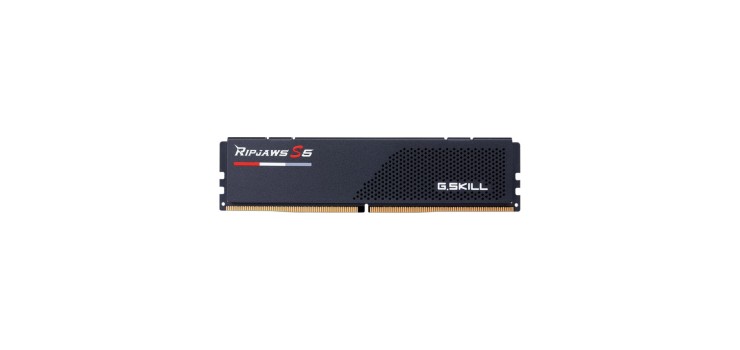
| G.Skill Ripjaws S5 | DDR5 16GB | 6000MHz CL32 | Tk 34,560 (regular Tk 36,640) |
Prices as of October 2026 — stock and prices change, please call or WhatsApp to confirm. Offer prices run until 30 Nov 2026.
All prices are per single stick. See every module in Desktop RAM.
Which desktop RAM should you buy?
- Office or shop PC on a DDR4 board: one or two Netac Shadow III 8GB DDR4 at Tk 8,250 (regular Tk 8,750). One stick is enough for basic work; two matching sticks give dual-channel.
- Best value 16GB DDR4: Netac Basic 16GB DDR4 3200MHz at Tk 12,640 (regular Tk 13,400) — the lowest price per GB in our list, and it leaves a slot free on 2-slot boards.
- Gaming DDR4 with XMP: G.Skill Ripjaws V 16GB at Tk 16,960 (regular Tk 17,980), or the Corsair Vengeance LPX 16GB at Tk 15,660 (regular Tk 16,600).
- AM5 / DDR5 budget: Kingston FURY Beast 8GB DDR5 5600MHz at Tk 21,820 (regular Tk 23,130) — buy two for 16GB dual-channel.
- AM5 / DDR5 performance: G.Skill Ripjaws S5 16GB DDR5 6000MHz CL32 at Tk 34,560 (regular Tk 36,640), on a board like the MSI PRO B650M-P DDR5 at Tk 16,530 (regular Tk 17,530).
Planning a full build? See PC Build Price in Bangladesh 2026 for complete parts lists, and pair your RAM upgrade with a fast drive using our SSD vs HDD guide.
FAQs
Q: Can I put DDR5 RAM in a DDR4 motherboard?
A: No. DDR4 and DDR5 sticks have different notches and do not fit each other's slots. Your board's memory type decides which one you buy.
Q: Is 8GB RAM enough for a PC in 2026?
A: For basic office work and browsing, yes. For gaming, freelancing, design or heavy multitasking, 16GB is the better choice.
Q: Is 2x8GB better than 1x16GB?
A: 2x8GB runs in dual-channel and is faster, especially with integrated graphics. 1x16GB is easier to upgrade later on a 2-slot board. Best of both: 2x16GB if your budget allows.
Q: What is the desktop RAM price in BD?
A: In our list, 8GB DDR4 3200MHz starts at Tk 8,250, 16GB DDR4 at Tk 12,640, 8GB DDR5 at Tk 21,820 and 16GB DDR5 6000MHz at Tk 34,560, all per stick.
Q: Can I use laptop RAM in a desktop?
A: No. Laptops use SO-DIMM and desktops use full-size DIMM sticks; they do not fit each other, even at the same DDR type and speed.
Order from Noakhali Tech
Order desktop RAM online with Cash on Delivery all over Bangladesh. Not sure which stick fits your board? Call or WhatsApp +880 1775-682829 with your motherboard or PC model for a quick answer and quotation. For installation, upgrades or a full PC check-up, send a service request.
Comments
No comments yet — share your thoughts below.