
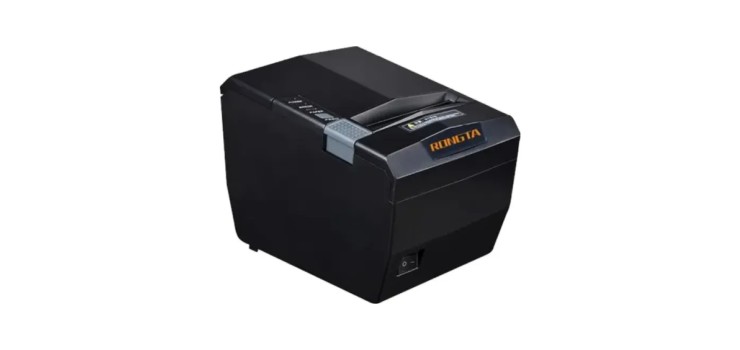
সংক্ষেপে: Choose a 58mm thermal printer for small shops, tea stalls and mobile billing where receipts are short and budget is tight; our 58mm models start at 4,290 Tk. Choose an 80mm printer for super shops, pharmacies and restaurants that print longer, clearer bills all day. If you need barcode stickers or price tags, that is a separate job for a label printer.
Every week shop owners ask us two things: what is the POS printer price in Bangladesh, and should I buy 58mm or 80mm? The answer to the 58mm vs 80mm thermal printer question depends on how long your bills are, how many customers you serve per hour and where the printer will sit. This guide explains receipt printers versus label printers, paper width, connection types, thermal paper, cash drawer connection and driver setup in plain words, then gives our picks by shop type and budget.
Receipt printer vs label printer: two different jobs
A receipt printer (POS printer) prints the customer's bill on a continuous roll of thermal paper. It is the printer you need for any receipt printer for shop setup: grocery, pharmacy, restaurant, salon or showroom.
A barcode label printer prints on sticker labels: barcode stickers for loose or self-packed products, price tags, shelf labels and shipping labels. If your products already carry a manufacturer barcode and you only bill, you may not need one at all. If you pack rice, spices, sweets, bakery items or clothing yourself, a label printer lets you print your own barcodes for your scanner to read.
One of our models, the Xprinter XP-365B-U, is listed as a label + receipt printer, so a small shop can start with one machine for both jobs.
58mm vs 80mm thermal printer: what really changes
The number is the width of the paper roll. Everything else follows from that.
| Point | 58mm | 80mm |
|---|---|---|
| Receipt width | Narrow, like a small slip | Wider, looks like a proper bill |
| Text per line | Fewer characters; long product names wrap to two lines | More characters; item, qty, rate and total fit more neatly |
| Size | Compact, fits a small counter | Larger body |
| Best for | Small shop, tea stall, mobile shop, delivery and field billing | Super shop, pharmacy, restaurant, busy counter |
| Our price range | 4,290 Tk to 4,620 Tk | 8,030 Tk to 14,260 Tk |
Paper cost matters too: an 80mm receipt uses more paper per bill than a 58mm one. If your bills are only 3 to 5 items and you print a few dozen a day, 58mm is perfectly fine. If customers buy 20 items at a time, a 58mm bill becomes long and hard to read, and an 80mm printer is worth the extra money.
Our POS receipt printers and prices
| Model | Paper | Interface | Key specs | Price |
|---|---|---|---|---|
| Rongta RP58E-U | 58mm | USB | Print speed 100mm/s | 4,290 Tk (regular 4,550 Tk) |
| Xprinter XP-58IIL | 58mm (paper width 57.5mm) | USB, Bluetooth | Mini direct thermal | 4,620 Tk (regular 4,900 Tk) |
| Xprinter XP-P810 | 80mm | USB + Bluetooth | Portable, battery powered | 8,030 Tk (regular 8,520 Tk) |
| Rongta RP327-UP | 80mm (paper width 78mm) | USB | 250mm/s, 203dpi | 8,580 Tk (regular 9,100 Tk) |
| Epson TM-T81III | 80mm | USB version (Ethernet version also exists) | Thermal line printing, 203x203 dpi | 14,260 Tk (regular 15,120 Tk) |
Prices as of October 2026 — stock and prices change, please call or WhatsApp to confirm. Offer prices run until 30 November 2026. See every model in our POS receipt printer category.
USB, LAN or Bluetooth?
- USB: the simplest choice for one billing PC at one counter. Plug in, install the driver, print. Most of our receipt printers are USB.
- LAN (Ethernet): the printer sits on your network, so it can be placed away from the PC, for example a kitchen printer in a restaurant, or shared by more than one billing computer. Among our receipt printers, the Epson TM-T81III has an Ethernet version; ask us for it when you order.
- Bluetooth: for printing from a phone or tablet, or for billing on the move. The Xprinter XP-58IIL and XP-P810 have Bluetooth along with USB. Whether your mobile billing app can print to it depends on the app, so test it or ask us first.
Auto-cutter: do you need one?
An auto-cutter cuts the receipt automatically after printing, so the cashier does not tear it by hand. On a busy super shop or restaurant counter this saves time and gives a clean edge. On a small shop, tearing by hand against the tear bar is fine. Auto-cutter is not listed in the specs we have for our models, so if it is a must for you, call or WhatsApp us before ordering and we will confirm for the exact model.
Thermal paper basics
- No ink, no toner: thermal printers heat special coated paper to make the print. The only running cost is paper.
- Match the width: 58mm paper for 58mm printers, 80mm paper for 80mm printers. Also make sure the roll diameter fits inside the printer.
- Load it the right way: only one side of the roll is coated. If the printer feeds blank paper, flip the roll. Scratch the paper with a fingernail; the side that shows a dark mark is the print side.
- Store it well: heat, sunlight and moisture darken or fade thermal paper. Keep spare rolls in a cool, dry place, and keep important receipts out of the sun.
We do not sell thermal paper rolls at the moment. Call or WhatsApp us and we can advise on the right size.
Connecting a cash drawer through the printer
Most shop cash drawers do not connect to the computer directly. Instead, an RJ11/RJ12 cable (it looks like a telephone cable) goes from the drawer into the cash drawer port on the receipt printer. When the billing software prints a receipt, the printer sends a small pulse to the drawer and it springs open.
- Check that your receipt printer has a cash drawer port before you buy a drawer.
- Plug the drawer's RJ11/RJ12 cable into that port, not into a network port.
- Turn on the "open cash drawer" option in your billing software or in the printer driver settings.
- Print a test bill and check that the drawer opens.
Our Rongta RT-335, Maken MK410 and Rongta RT-425A drawers list RJ11/RJ12 for opening from the POS printer, and the Yumite YT-405 also lists USB and RS232. Compare them in our cash drawer category.
Installing the driver and first test
- Load paper and power on. On many models, holding the feed button while switching on prints a self-test page, which confirms the printer itself works.
- Install the Windows driver from the CD or the manufacturer's website, choosing the correct model.
- Connect the cable and select the correct port (USB, network or Bluetooth) during or after installation.
- Set the paper size to 58mm or 80mm in the printer preferences.
- Print a Windows test page, then choose this printer inside your billing software. POS printers work with most billing software through the Windows driver.
- Fix common problems: blank paper means the roll is upside down; cut-off text means the paper size or margin setting is wrong; nothing at all means the wrong port is selected.
Label printers: direct thermal vs thermal transfer
Label printer price in BD depends mostly on the print method and build.
- Direct thermal: prints straight onto heat-sensitive labels, with no ribbon. Simple and cheap to run, good for price tags, shelf labels and short-life labels, but like receipt paper the print can fade with heat and time.
- Thermal transfer: uses a ribbon that melts onto the label. The print lasts longer and resists rubbing better, which suits products stored for a long time, warehouse stock and labels that get handled a lot.
| Model | Print method | Width | Speed / resolution | Interface | Price |
|---|---|---|---|---|---|
| Xprinter XP-365B-U | Direct thermal (label + receipt) | Up to ~80mm labels | 203dpi | USB | 8,580 Tk (regular 9,100 Tk) |
| Xprinter XP-420B | Direct thermal | 4-inch (108mm) | Up to 6 ips | USB | 10,120 Tk (regular 10,730 Tk) |
| Rongta RP400H | Thermal transfer + direct thermal | 4-inch | 4-5 ips | U (USB) and USEP (USB/Serial/Ethernet/Parallel) variants | 12,420 Tk (regular 13,170 Tk) |
| Zebra GT820 | Thermal transfer | 4-inch | 127mm/s (5 ips), 203dpi | USB | 27,000 Tk (regular 28,620 Tk) |
Prices as of October 2026 — stock and prices change, please call or WhatsApp to confirm. More models are in our barcode label printer category.
Which one should you buy? Our picks
- Small grocery or mobile shop, lowest budget: Rongta RP58E-U (4,290 Tk), simple USB 58mm.
- Small shop that also bills from a phone: Xprinter XP-58IIL (4,620 Tk) with USB and Bluetooth.
- Home delivery, events or field sales: Xprinter XP-P810 (8,030 Tk), battery powered 80mm.
- Pharmacy, super shop or restaurant counter: Rongta RP327-UP (8,580 Tk), 80mm at 250mm/s.
- Brand-name printer, or a network (Ethernet) printer for a kitchen: Epson TM-T81III (14,260 Tk).
- Small shop needing both stickers and receipts: Xprinter XP-365B-U (8,580 Tk).
- Price tags and shelf labels in volume: Xprinter XP-420B (10,120 Tk).
- Long-lasting labels, warehouse or factory: Rongta RP400H (12,420 Tk) or Zebra GT820 (27,000 Tk).
Planning a full counter with a scanner, printer, drawer and POS terminal? Read our shop POS system setup guide for complete budget setups.
FAQs
Q: What is the POS printer price in Bangladesh?
A: At Noakhali Tech, 58mm thermal receipt printers are 4,290 Tk to 4,620 Tk, and 80mm printers are 8,030 Tk to 14,260 Tk at our October 2026 offer prices.
Q: Is a 58mm or 80mm thermal printer better for a shop?
A: 58mm is cheaper and smaller, fine for short bills. 80mm prints wider, easier-to-read bills and suits busy counters with long bills, such as super shops, pharmacies and restaurants.
Q: Can I print barcode labels with a receipt printer?
A: A normal receipt printer prints on continuous paper, not stickers. Use a label printer, or the Xprinter XP-365B-U, which is listed for both labels and receipts.
Q: Does a thermal printer need ink?
A: No. Receipt printers and direct thermal label printers only need thermal paper or labels. Thermal transfer label printers also need a ribbon.
Q: Will the printer work with my billing software?
A: POS printers work with most billing software through the Windows driver. We do not sell POS software, so if you are unsure, tell us your software name on call or WhatsApp before ordering.
Order your POS printer from Noakhali Tech
Order online with Cash on Delivery all over Bangladesh. For bulk or office quotations, call or WhatsApp +880 1775-682829. Need help installing the printer, cash drawer or the full counter? Send us a service request and our team will contact you.
Comments
No comments yet — share your thoughts below.